Designing Consistency
in AI-Generated Interfaces
Controlling LLM-Generated UI Through a Reusable Component Registry
ROLE
UX/UI Designer
TIMELINE
2025
.png)
TL;DR
This case explores how I turned AI-assisted interface generation from an unpredictable prototyping shortcut into a controlled workflow for reusable UI output.
Instead of relying on open-ended prompts, I structured the process around a component registry, code-backed references, strict generation rules, and reusable UI patterns. In Figma Make, this meant constraining the model to assemble interfaces from predefined components instead of generating new structures freely.
The result was a more predictable prototyping process: 40+ prototypes were built in the first month, new template versions were adopted without workflow disruption, and generated interfaces became more consistent with real product constraints.
When AI Speed Created Interface Drift
In October 2025, I started exploring how generative AI could support real product workflows through AI-assisted prototyping.
The expectation was speed. The reality was inconsistency.
Operating under the limitations of the Figma Organization plan, where Figma Make could not rely on a robust shared component library, each generated interface behaved like an isolated artifact. There was no continuity between iterations, no guarantee of structure, and no reliable way to reuse or scale what was generated.
The issue was not AI capability. It was the lack of a controlled structure around it.
What initially appeared to accelerate prototyping exposed a deeper problem: the challenge was not generating interfaces, but maintaining consistency across them.
To comply with my non-disclosure agreement, I have omitted and obfuscated confidential information in this case study.
PROBLEM
From Open-Ended Prompts to Controlled Generation
At that point, the challenge stopped being about speed and became a question of control.
How could AI-generated UI become consistent, predictable, and reusable within real product constraints?
Instead of treating Figma Make as a shortcut for generating screens, I reframed it as an execution layer that needed boundaries, source-of-truth references, and predictable rules. The goal was not to let the model invent interfaces, but to make it assemble them from a defined structure.
I restructured the workflow around explicit inputs, constraints, and expected outputs. Instead of relying on broad prompt interpretation, I prioritized a repeatable process where the model had a limited set of valid choices.
Aligning AI Output
With Real Implementation
To prevent generated UI from drifting away from production reality, I created a source-of-truth layer outside the generation process.
GitHub stored component definitions and structure.
Figma Sites acted as the interface layer connecting visual output and code-backed references.
Figma Make operated within those references instead of generating unsupported patterns freely.
This helped ensure that outputs were not isolated artifacts, but extensions of a defined component structure aligned with implementation constraints.
APPROACH
Registry-Based Prompting
Instead of describing interfaces from scratch, I defined a closed component registry.
The model was instructed to use only predefined components, preserve structure, props, and behavior, and avoid introducing new patterns or styles. Each component acted as a constraint, not a suggestion.
This shifted AI from a generator of new UI into an executor of predefined interface rules.
CONSTRAINT LAYER
Enforcing Consistency
The workflow relied on strict rules:
-
No creation of new component structures.
-
No deviation from predefined styles.
-
No modification of SVG definitions.
-
No introduction of unsupported visual patterns.
These constraints enabled consistent outputs across iterations, reusable components without rework, and scalable generation without structural drift.
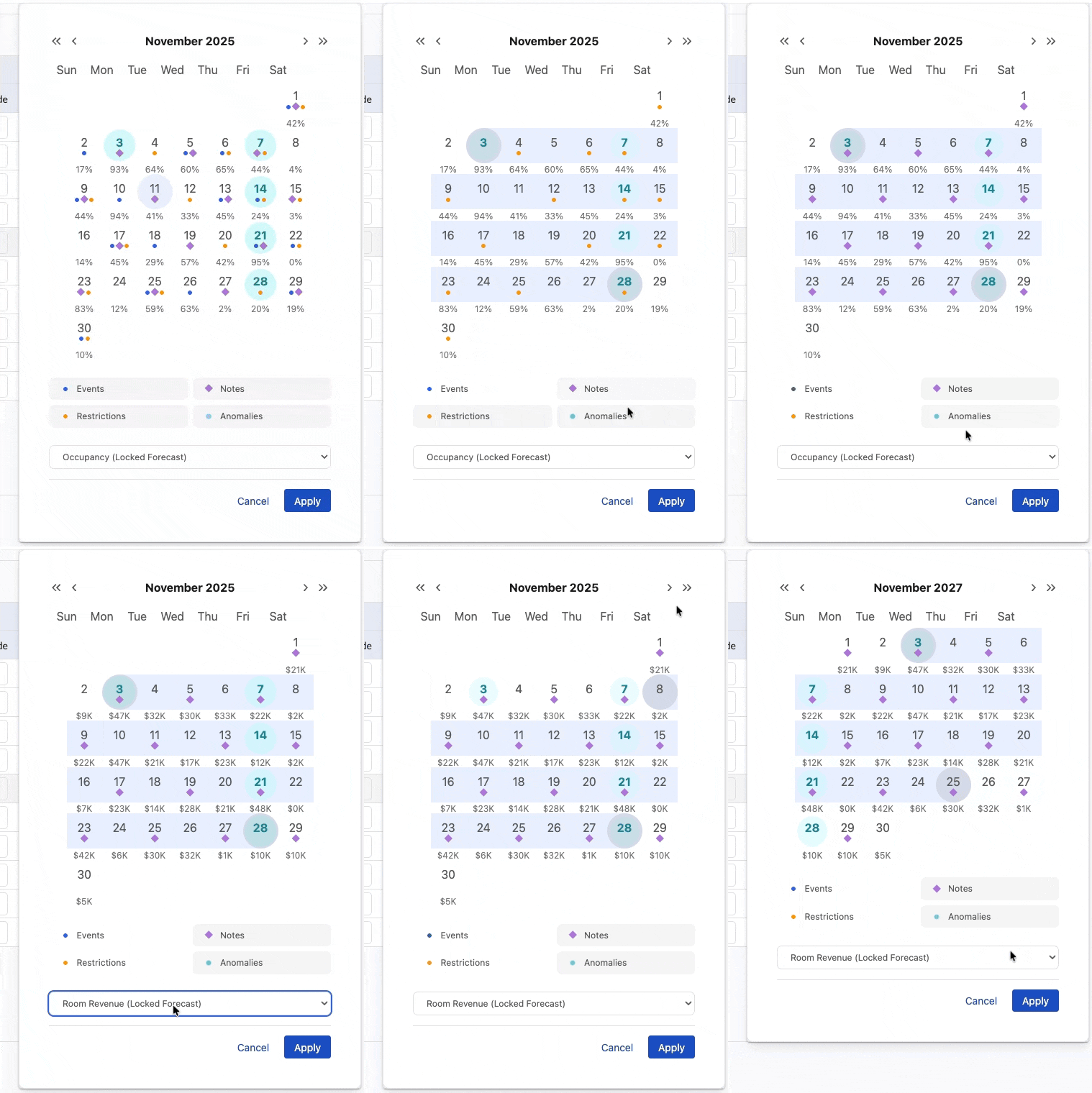
The system was applied across 40+ prototypes within the first month, maintaining consistency without structural drift.
TRADE-OFFS
Choosing Reliability Over Flexibility
This approach introduced deliberate trade-offs.
Early exploration became less flexible, new component variations required upfront definition, and the workflow depended on discipline to maintain the registry.
However, those constraints were intentional. In this context, reliability mattered more than open-ended generation.
The base template evolved over time, incorporating new components and expanding its capabilities without breaking consistency. Additional versions were introduced and adopted within Figma Make while maintaining stability across iterations.
Without this discipline, the workflow can degrade. That limitation became part of the lesson: AI output only remains useful when the structure around it is maintained.
Outcome
From AI Output to
Reliable Prototypes
The controlled workflow transformed AI-generated UI from an exploratory shortcut into a reliable part of the prototyping process.
Instead of rebuilding interfaces at each iteration, the team could start from a consistent, pre-structured foundation. Within the first month:
-
40+ prototypes were built using the workflow.
-
The template evolved without breaking structure.
-
New versions were adopted without disrupting the process.
Using the template became part of the team’s standard AI prototyping workflow.

“Before Giovanny’s work on the AI component library, we would have to create all the basic components from scratch, then spend time refining the output of the AI models. Now, we can start with a standardized template in which all of the components are already built and styled correctly. It saves us an hour of work for each new prototype that we build.”
- Head of UX at Duetto (Charles Shimooka)
The system replaced variability with consistency, enabling reliable and repeatable UI generation across the team.
It reduced rework, improved iteration speed, and aligned AI-generated output with real product constraints.
In simple terms:
In simple terms, I created a process that constrained AI to assemble interfaces from predefined components, replacing unpredictable generation with repeatable, product-aligned output.